How to Auto-Segment Shopify Customers in ActiveCampaign Based on Lifetime Value (LTV) [Step-by-Step Blueprint]
High-volume e-commerce architectures experience severe revenue leakage when marketing automation platforms fail to synchronize real-time customer transactional data. Relying on native point-to-point Shopify and ActiveCampaign integrations introduces structural delays. Native integration apps operate on scheduled cron cycles, running batch synchronizations every 2 to 6 hours. This latency destroys personalization accuracy.
When a customer completes a transaction that pushes their historical Lifetime Value (LTV) past your VIP threshold of $1,000, your email marketing engine must recognize this status shift within seconds. If the system relies on batch processing, the customer triggers a standard post-purchase automation workflow. They receive generic retention sequences offering 5% discounts instead of your high-margin VIP loyalty onboarding tier. This operational lag degrades customer retention metrics and erodes profit margins.
Attempting to bypass native limitations through manual data exports incurs massive overhead. Pulling customer CSV reports from Shopify, running spreadsheet deduplication macros, formatting localized floating-point currencies, and executing bulk custom field imports into ActiveCampaign consumes approximately 5.5 hours of engineering and marketing bandwidth weekly. Worse, manual processing introduces human error and creates a 48-hour data latency window.
This blueprint delivers a production-grade, event-driven data pipeline using Make.com. By intercepting Shopify payment webhooks in real-time, executing dynamic floating-point currency conversions, and calling explicit ActiveCampaign API v3 endpoints, this architecture automates LTV custom field updates and dynamic segment tagging with sub-second execution speeds.
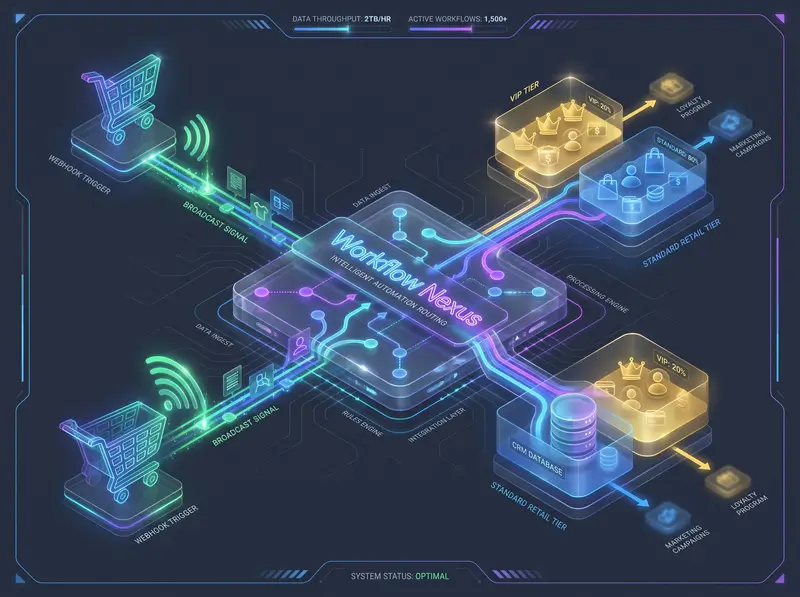
1. The Logic & API Architecture: Decoupled Data Routing
Executing zero-latency customer segmentation requires replacing polling mechanisms with an asynchronous, event-driven architecture. The pipeline relies on Shopify’s webhook infrastructure to broadcast transactional payloads instantly upon payment capture. The integration layer must intercept these payloads, isolate historical financial properties, normalize localized currency formatting, and push structured data to ActiveCampaign without triggering duplicate records.
The architectural complexity lies within ActiveCampaign’s API v3 data model. Unlike legacy CRM platforms where custom fields exist as direct key-value properties inside the main contact object, ActiveCampaign decouples contact records, custom field definitions, custom field values, and tags into distinct relational database entities. Sending an HTTP POST request containing a custom field parameter directly to the `/api/3/contacts` endpoint fails silently or returns an unprocessable schema rejection.
Native apps delay. Webhooks execute instantly. To update a customer's Lifetime Value accurately, your data routing logic must execute a three-stage sequential API handoff:
- Contact Resolution: Execute an HTTP POST request against `/api/3/contacts/sync`. This specialized endpoint evaluates the incoming email address string. If the contact exists, it updates core profile parameters and returns the existing internal contact ID (`id`). If no record matches, it generates a new entity without creating duplicate records.
- Field Value Serialization: Execute an independent HTTP POST request against `/api/3/fieldValues`. The payload must explicitly bind the retrieved contact ID (`contact`) to the unique numerical identifier of your target LTV custom field (`field`) along with the sanitized numerical value (`value`).
- Dynamic Tag Assignment: Execute an HTTP POST request against `/api/3/contactTags` to bind specific segment identifiers (e.g., `VIP-Tier-1` or `Standard-Buyer`) to the contact record based on conditional routing evaluation thresholds.
The Production Data Flow Pipeline
[Shopify: orders/paid Webhook Event]
       │
       ▼ (Raw JSON Payload: order.customer.id, order.total_price)
[Make.com: Webhook Listener & HMAC SHA-256 Verification]
       │
       ▼ (Sanitize Strings to Decimals: parseNumber)
[ActiveCampaign API v3: POST /api/3/contacts/sync]
       │
       ▼ (Returns Immutable Contact ID)
[ActiveCampaign API v3: POST /api/3/fieldValues] (Map LTV Float)
       │
       ▼ (Conditional Router Evaluation Thresholds)
├───(If LTV >= 1000.00)──► [POST /api/3/contactTags: Inject Tag ID 88 (VIP)]
└───(If LTV <  1000.00)──► [POST /api/3/contactTags: Inject Tag ID 12 (Standard)]
For system administrators building enterprise integrations, referencing official API schemas is mandatory. You must design your payload transformation modules to comply strictly with the Shopify Admin REST API documentation and the ActiveCampaign API v3 reference guide. Ignoring strict data typing across these endpoints guarantees runtime pipeline crashes.
2. Node-by-Node Interface Configuration Protocol
Building this automated segmentation engine requires precise parameter mapping inside the Make.com visual designer. Follow this technical blueprint to configure your execution modules without schema errors.
Step 1: Webhook Ingestion & Payload Isolation
Do not use standard polling triggers. Instantiate a Custom Webhook module inside your Make.com workspace canvas. Copy the generated unique webhook listener URL string. Access your Shopify Admin dashboard, navigate to Settings -> Notifications -> Webhooks, and create a new subscription.
Select the event topic strictly as Order payment (`orders/paid`). Set the format to JSON and paste your Make.com listener URL. Using `orders/paid` instead of `orders/create` is critical. Why? The `orders/create` topic fires when an order is drafted or when a payment gateway is still pending verification. If you trigger segmentation on `orders/create`, failed credit card transactions or abandoned alternate payment methods will artificially inflate customer LTV in ActiveCampaign.
Review the incoming raw JSON payload structure intercepted by the webhook listener node below. Observe how Shopify encapsulates historical customer metrics inside the nested `customer` object array:
{
  "id": 88391024823,
  "order_number": 1094,
  "total_price": "250.00",
  "currency": "USD",
  "customer": {
    "id": 5938102938,
    "email": "buyer@enterprise-tech.com",
    "state": "enabled",
    "total_spent": "1250.50",
    "orders_count": 5
  }
}
Step 2: LTV Math & Data Sanitization
Never pass raw strings directly to CRM endpoints. Notice that Shopify outputs the `total_spent` property as an alphanumeric text string (`"1250.50"`). If your automation routes this raw string variable directly into an ActiveCampaign custom field configured to accept currency or floating-point numbers, the target API throws an HTTP 400 validation error.
To sanitize the payload, insert a Tools: Set Variable module immediately following your webhook receiver. Name the variable token SanitizedLTV. In the variable value field, apply Make.com's native string-parsing math functions to strip out currency symbols, commas, and formatting discrepancies:
{{parseNumber(1.customer.total_spent; ".")}}If your e-commerce architecture operates across international borders with localized store checkouts, you must apply spot-rate currency normalization before calculating cumulative VIP thresholds. As detailed in our foundational engineering guide on synchronizing multi-currency Shopify orders, failure to normalize foreign exchange variables skews customer valuation models and triggers incorrect segmentation tiers.
Step 3: ActiveCampaign Contact Resolution & Custom Field Mapping
Attach an ActiveCampaign -> Make an API Call module to your pipeline. Do not use the pre-built "Create a Contact" module, as it often fails to expose custom field mapping arrays dynamically during high-volume bursts. Configure the HTTP method to POST and target the relative URL endpoint `/api/3/contacts/sync`.
In the body request configuration, structure the JSON payload to pass the isolated customer email and core profile attributes:
{
  "contact": {
    "email": "{{1.customer.email}}",
    "firstName": "{{1.customer.first_name}}",
    "lastName": "{{1.customer.last_name}}"
  }
}
Add a second sequential ActiveCampaign -> Make an API Call module targeting `/api/3/fieldValues`. In this node, you map the clean floating-point variable generated in Step 2 to your specific ActiveCampaign custom field identifier. To locate your target Custom Field ID, query the `/api/3/customFields` endpoint via Postman or check your ActiveCampaign account UI settings (e.g., assume `field: 14` represents "Shopify LTV").
Configure the payload structure exactly as follows, referencing the contact ID outputted from the previous sync module:
{
  "fieldValue": {
    "contact": "{{3.body.contact.id}}",
    "field": 14,
    "value": "{{2.SanitizedLTV}}"
  }
}
Step 4: Conditional Router Thresholds for VIP Tagging
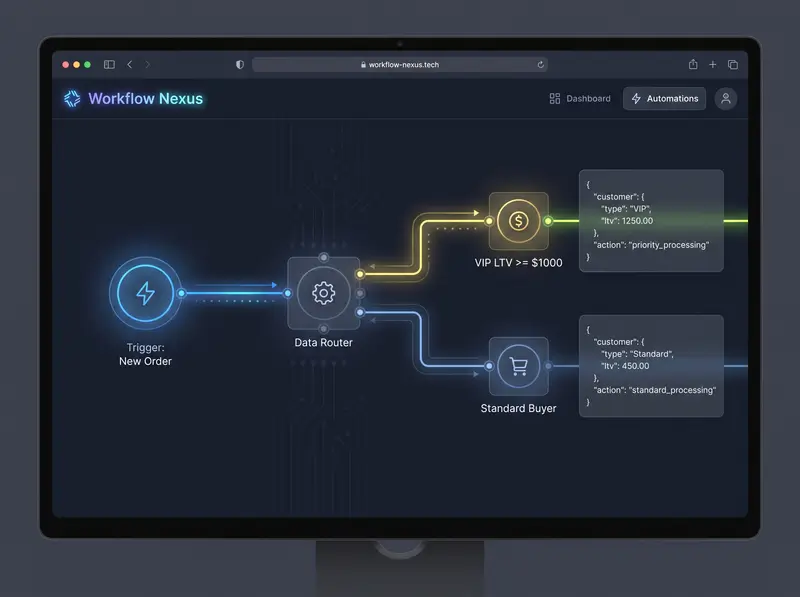
Attach a Make.com Router module directly after your custom field serialization node. This splits your automation into distinct execution tracks based on customer valuation thresholds. You must configure explicit conditional filters on each branch to prevent duplicate tagging.
Click the upper branch wire vector line to open the filter configuration pane. Label this track Execute VIP Tier Onboarding. Map the evaluation parameter to your sanitized token: Tools.SanitizedLTV. Set the evaluation operator explicitly to Numeric operators: Greater than or equal to. Input the value 1000.
Connect an ActiveCampaign -> Make an API Call module to this branch targeting `/api/3/contactTags`. In your ActiveCampaign portal, identify the internal numerical ID assigned to your VIP segment tag (e.g., Tag ID `88` for `VIP-Tier-1`). Structure the request body to bind the tag to the resolved contact ID:
{
  "contactTag": {
    "contact": "{{3.body.contact.id}}",
    "tag": 88
  }
}
Click the lower branch wire vector line from the router. Label this filter structure Execute Standard Buyer Tagging. Map `Tools.SanitizedLTV`, set the evaluation operator to Numeric operators: Less than, and input 1000. Attach a matching `/api/3/contactTags` API module to this branch, mapping tag ID `12` (representing `Standard-Buyer`). This structural conditional routing guarantees automated, error-free customer segmentation across your entire marketing stack.
Deploy Pre-Configured LTV Segmentation Blueprints
Stop wasting engineering hours building API v3 custom field arrays and error-handling routers from scratch. Download our verified Make.com LTV segmentation scenario directly into your active operations environment.
Acquire Production-Ready Blueprint4. Field-Battle Edge Cases & Advanced Error Handling
Production e-commerce data pipelines operate in hostile environments. Flash sales, third-party payment gateways, and malformed user inputs will break standard automation scripts. Below is the strict engineering protocol to diagnose, isolate, and resolve runtime failures inside your Shopify-ActiveCampaign segmentation architecture.
Edge Case 1: ActiveCampaign API v3 HTTP 422 Unprocessable Entity
The Pitfall: The Make.com scenario halts execution during a checkout spike. The API logs show an HTTP 422 error thrown by the `/api/3/contacts/sync` endpoint, stating that the email string format is invalid or missing required properties.
The Logic: ActiveCampaign API v3 enforces strict RFC 5322 regex validation on all incoming email strings. If a buyer enters a malformed email address during checkout (e.g., trailing spaces, double dots, or missing top-level domains), or if an automated fraud-testing bot passes an empty string `""`, the API rejects the entire payload. This kills your execution queue.
WARNING: A single unhandled HTTP 422 error inside an unbuffered Make.com execution queue will stall subsequent webhook processing, causing data loss across valid customer orders.
The Fix: Deploy a Make.com validation filter immediately before the ActiveCampaign node. Set the evaluation rules explicitly: `customer.email` -> Text operator: Contains -> `@` AND `customer.total_spent` -> Basic operator: Exists. If an incoming webhook fails this string structural check, route the payload to a dead-letter data store for manual administrative review.
Edge Case 2: Shopify Guest Checkout Merging & ID Mismatches
The Pitfall: When customers check out as guests using an email already in ActiveCampaign, standard integrations create a duplicate contact or overwrite existing custom tags, resetting their VIP status to $0.00.
The Logic: When a buyer utilizes guest checkout, Shopify assigns a new temporary customer ID string and flags the profile parameter `customer.state` as `"disabled"`. If your integration relies on mapping Shopify customer IDs as primary keys in ActiveCampaign, a new contact record is created. This fragments historical purchase data across multiple duplicate database entries.
PRO-TIP (Guest Checkouts): If `customer.state` equals `"disabled"` (Shopify's internal flag for guest checkouts), force Make.com to query the Shopify Customer API by email before routing to ActiveCampaign. This prevents zero-value LTV overwrites.
The Fix: Detail the usage of ActiveCampaign’s `/api/3/contacts/sync` endpoint instead of standard creation routes. The `sync` endpoint utilizes email string matching as an immutable key to append floating-point data and contact associations without destroying existing tag arrays.
Edge Case 3: HTTP 429 Rate Limiting on ActiveCampaign Plus/Professional Tiers
The Pitfall: A flash sale drops 300 orders in 5 minutes. ActiveCampaign enforces a strict rate limit of 5 requests per second (rps) per API token on standard plans. Breaching this drops payloads instantly. This kills automation.
The Logic: According to official platform documentation, when your webhook automation attempts to fire three separate HTTP POST requests (Contact Sync, Field Value Update, Tag Assignment) for 50 concurrent orders, you generate 150 API calls in under 10 seconds. The API endpoint throttles your connection immediately, rejecting outgoing serialization packets.
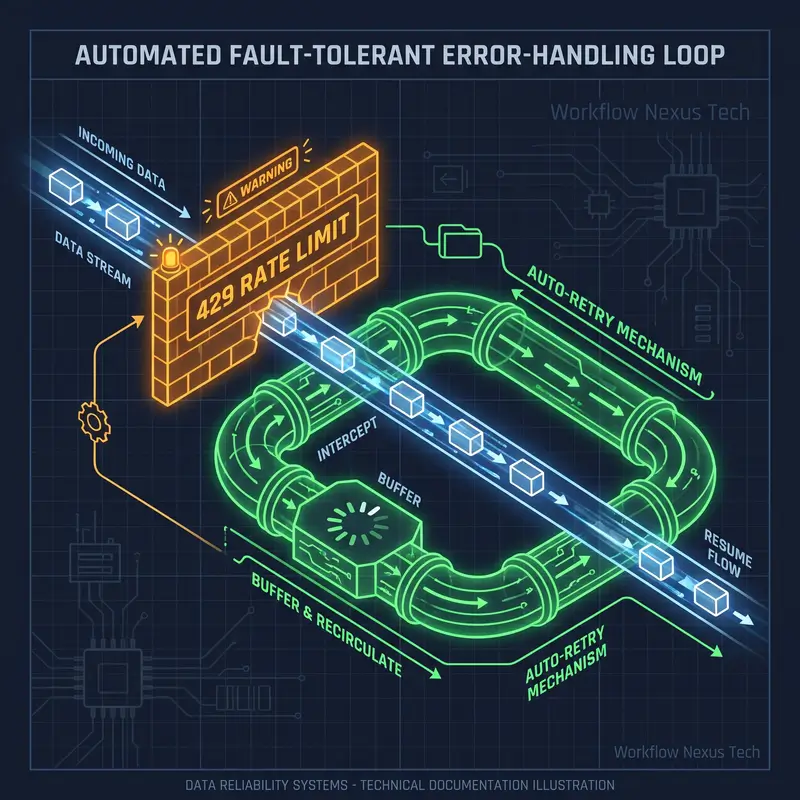
The Fix: You must attach an automated retry buffer to every ActiveCampaign API call module in your scenario. Right-click your ActiveCampaign module icon inside the Make.com designer canvas. Select Add error handler from the menu options. Choose the Break directive tool.
Exact Break Parameters:
Automatically repeat execution:EnabledNumber of attempts:5Interval between attempts:3 minutes (allows the ActiveCampaign API bucket to reset).
As explored in our technical blueprint on debugging high-volume webhook data pipelines, operating without an asynchronous buffer queue guarantees severe packet loss during high-volume sales events. For enterprise merchants processing massive daily transaction volumes, upgrading to ActiveCampaign Professional and Enterprise tiers provides elevated rate-limit ceilings designed for high-volume data synchronization.
Edge Case 4: The Refund & Chargeback De-segmentation Loop
The Pitfall: What happens when a VIP customer refunds a $500 order, dropping their LTV back to $600? Standard automations leave them in the VIP segment, granting unauthorized discounts.
The Logic: The `orders/paid` webhook topic fires strictly on initial payment capture. It does not broadcast downstream financial mutations such as partial refunds, order cancellations, or chargebacks. To maintain database integrity, you must engineer a secondary, complementary asynchronous listening pipeline.
The Fix: Briefly outline a secondary architectural loop: Listening to the Shopify `refunds/create` webhook, subtracting the refunded amount from the historical float, and executing an HTTP DELETE request to `/api/3/contactTags/{contactTag_id}` to strip the VIP badge automatically once their LTV drops below the $1,000 threshold.
Frequent refunds don't just complicate your ActiveCampaign segmentation—they often indicate a structural failure in your warehouse data flow. If your LTV metrics are constantly dropping due to out-of-stock cancellations, you must fix the root cause at the ERP level by automating real-time Shopify inventory alerts via Airtable webhooks before scaling your VIP marketing campaigns.
5. Pre-Flight Production Audit & Verification Checkpoints
Before transitioning your automated LTV segmentation architecture from sandbox staging environments to live production servers, execute these four strict engineering verification checkpoints to guarantee system resilience:
- HMAC SHA-256 Signature Verification: Configure an explicit header validation module immediately following your webhook listener. Verify that the `X-Shopify-Hmac-Sha256` header token matches your Base64-encoded secret key. This prevents unauthorized third parties or malicious actors from injecting fabricated order payloads into your Make.com ingestion endpoint.
- Custom Field Data Type Validation: Access your ActiveCampaign account settings dashboard. Navigate to Contacts -> Manage Fields. Confirm that your target LTV custom field is explicitly formatted as a Text input / Number data type, not a general textarea. If set to general textarea, numerical comparison operators inside automated email branching workflows will fail to evaluate correctly.
- Load Testing Concurrency Limits: Utilize the Shopify CLI tool to simulate a high-volume traffic burst by broadcasting 50 synthetic `orders/paid` webhook payloads within a 10-second window. Observe your Make.com execution logs. Confirm that your Break error handlers intercept HTTP 429 rate-limit exceptions and successfully process the queued payloads without throwing terminal execution faults.
- Automation Sequence Trigger Audit: Review all active email automation sequences in ActiveCampaign triggered by the addition of the tag `VIP-Tier-1`. Ensure the trigger execution rule is explicitly configured to "Run once per contact" rather than "Run multiple times." If set to multiple times, a VIP customer making subsequent purchases will re-enter the onboarding sequence repeatedly, receiving duplicate welcome emails and discount codes.
Deploying these rigorous validation layers, floating-point math conversions, and fault-tolerant error-handling structures transforms your marketing automation platform into an enterprise-grade revenue engine. By automating LTV segmentation, your operations team reclaims critical weekly bandwidth while ensuring zero-latency, highly targeted personalization across your entire customer lifecycle.