Automated Inventory Alerts: Syncing Airtable Databases with Shopify [Make.com Blueprint]
Manual inventory management destroys retail profit margins. E-commerce architectures relying on standard CSV data uploads or delayed API polling mechanisms inevitably experience overselling cascades. Polling an inventory database every 15 minutes creates a 14-minute vulnerability window. During a high-traffic promotional event, out-of-stock items remain active on your storefront, allowing customers to execute transactions for phantom inventory.
The financial impact of negative inventory is entirely quantifiable. When the `available` integer metric drops below `0`, warehouse operations halt instantly. Support teams must manually issue refunds. Your accounting department absorbs unrecoverable payment gateway processing fees. Brand trust degrades rapidly.
Maintaining an accurate master Enterprise Resource Planning (ERP) database inside Airtable requires decoupled, asynchronous data routing. Batch processing causes overselling. Real-time webhooks protect inventory. This production blueprint utilizes Make.com to intercept Shopify’s `inventory_levels/update` webhook in real time, executing an HTTP PATCH request to overwrite your Airtable master stock integers instantly.
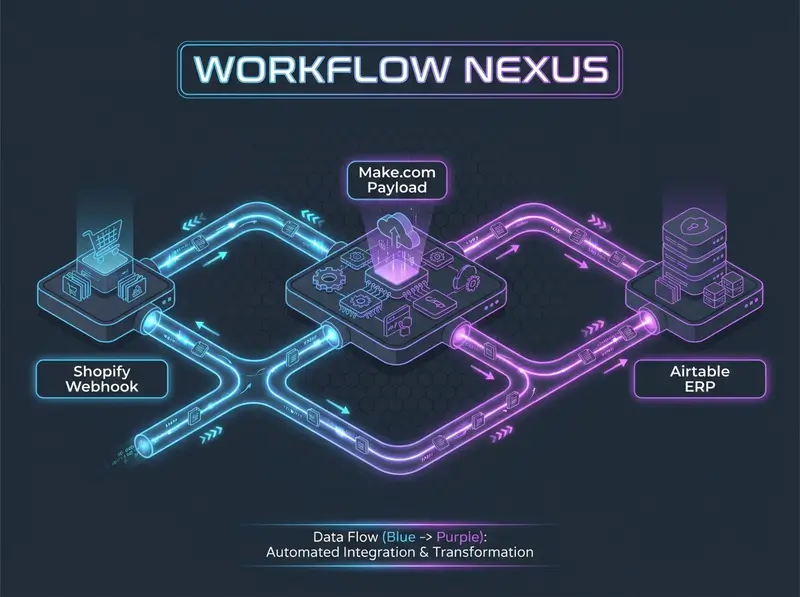
1. The Logic & API Architecture: Event-Driven Normalization
To eliminate overselling, the integration layer must capture inventory mutations the exact millisecond they occur. Shopify tracks inventory using an independent, isolated object architecture. Products and Variants are distinct entities from Inventory Items. When a warehouse worker receives new stock, or a customer completes a checkout, Shopify mutates the `inventory_level` object attached to a specific `location_id`.
If you rely on the standard `orders/create` webhook, you miss manual stock adjustments made inside the Shopify Admin panel. To maintain strict parity between your storefront and your Airtable ERP, you must subscribe strictly to the `inventory_levels/update` topic. This webhook fires on every single deduction, addition, or manual overwrite across your entire fulfillment network.
The subsequent data handoff to Airtable requires two specific, sequential API operations. First, the Make.com pipeline executes a GET request to search the Airtable base using a strict `filterByFormula` parameter. Second, it executes a targeted PATCH request to overwrite the specific stock field without erasing parallel properties like wholesale costs, supplier data, or historical SKU notes.
The Production Data Flow Pipeline
[Shopify: inventory_levels/update Webhook]
       │
       ▼ (Raw JSON: inventory_item_id, available)
[Make.com: Webhook Listener & Payload Isolation]
       │
       ▼ (Search by Shopify_Inventory_ID)
[Airtable REST API: GET /v0/{baseId}/{tableId}]
       │
       ▼ (Returns Airtable Internal Record ID)
[Airtable REST API: PATCH /v0/{baseId}/{tableId}]
       │
       ▼ (Conditional Router Evaluation)
├───(If available <= 10)───► [Slack API: Trigger "Low Stock" Alert]
└───(If available > 10)────► [Terminate Thread Execution]
Authentication protocols for database manipulation have shifted strictly toward scoped access. Airtable deprecated static API keys in 2024. Your infrastructure must now utilize explicit Personal Access Tokens (PAT). When generating your PAT inside the developer console, you must strictly assign the `data.records:read` and `data.records:write` authorization scopes. Referencing the Airtable REST API official documentation guarantees your tokens possess the correct base constraints before deployment.
2. Node-by-Node Interface Configuration Protocol
Executing this architecture requires precise parameter mapping inside the Make.com visual designer. Incorrect data typing causes immediate validation failures. Follow this node sequence exactly.
Step 1: Webhook Ingestion & Payload Isolation
Instantiate a Custom Webhook module inside your Make.com workspace canvas. Copy the unique URL address string generated by the system. Access your Shopify Admin dashboard, navigate to Settings -> Notifications -> Webhooks, and create a new subscription targeting the Inventory level update topic. Set the format parameter to JSON.
Review the specific structural output of this webhook payload carefully. Notice that it does not contain standard product titles, SKU strings, or pricing variables. It exclusively outputs immutable numerical database identifiers.
{
  "inventory_item_id": 808950810,
  "location_id": 905684977,
  "available": 8,
  "updated_at": "2026-07-28T14:32:12Z"
}
Never match records by product name. Names change. Database IDs are immutable. Your Airtable database must contain a dedicated column storing the `inventory_item_id` as the primary integration key.

Step 2: Airtable Record Resolution
Attach an Airtable -> Search Records module directly to your webhook trigger. Select your configured PAT connection and target your active inventory table. In the Formula parameter field, you must write a strict search condition using Airtable’s proprietary syntax to locate the exact record matching the incoming webhook payload.
Input the following query syntax exactly, replacing `Shopify_Item_ID` with the actual designated name of your column in Airtable:
{Shopify_Item_ID} = '{{1.inventory_item_id}}'This syntax isolates a single data row. Restrict the Limit field to `1` to optimize API processing speed and prevent array aggregation overhead.
Step 3: Inventory Serialization (HTTP PATCH)
Attach an Airtable -> Update a Record module. Select the identical base and table used in the previous step. In the Record ID parameter field, map the internal string identifier (`id`) outputted by the search module in Step 2. This guarantees you overwrite the correct row.
Locate your target stock integer column (e.g., `Current_Stock_Count`). Map the variable `1.available` from the Shopify webhook directly into this field. At the bottom of the module settings, toggle Smart links / Typecast to Yes. This critical step instructs the Airtable API to accept the incoming variable and forcibly cast it to match the column's defined numerical schema, preventing strict type-validation rejections.
Step 4: Conditional Router & Threshold Alerting
Warehouse managers must know immediately when inventory crosses dangerous operational thresholds. Attach a Make.com Router module directly after the Airtable update node to split the execution thread.
Click the upper branch wire line. Label this filter Low Stock Execution Protocol. Map the parameter token `1.available`. Set the evaluation operator to Numeric operators: Less than or equal to. Input your safety threshold value (e.g., `10`). Connect a Slack -> Create a Message module to this branch. Format the payload string to alert your procurement team explicitly:
🚨 *LOW STOCK ALERT* 🚨
Item ID: {{1.inventory_item_id}}
Remaining Available: {{1.available}}
Location ID: {{1.location_id}}
Action Required: Re-order immediately to prevent zero-balance out-of-stocks.
Click the lower branch wire line. Label it Stock Stable Termination. Set the condition to `1.available` Greater than `10`. Leave this branch completely empty. When stock remains stable, the execution thread terminates silently, saving Make.com operational resources.
Deploy the Complete Make.com Blueprint
Stop configuring complex formula syntaxes and conditional API routers manually. Import this exact, production-ready inventory synchronization pipeline directly into your active Make.com workspace to secure your stock levels today.
Acquire Production-Ready Blueprint4. Field-Battle Edge Cases & Advanced Error Handling
Operational data structures break under pressure. Rapid transactional spikes, multi-warehouse architectures, and strict platform API limit enforcement guarantee integration failures without proactive error buffering. Review the following edge case architectures to stabilize your ERP data flow.
Edge Case 1: Airtable HTTP 429 Rate Limiting (The 5 RPS Ceiling)
The Pitfall: A seasonal flash sale results in 30 inventory deduction webhooks firing within 4 seconds. The Make.com scenario history turns entirely red. The pipeline crashes with a repeated `HTTP 429` exception.
The Logic: The Airtable REST API enforces a brutal, hardcoded limit of 5 requests per second (rps) per base. This ceiling applies regardless of your enterprise pricing tier. When your Make.com integration attempts to process 30 rapid webhooks concurrently, the execution requests instantly breach the limit. Airtable drops the payloads. This kills your master ERP accuracy.

The Fix: Configure a dedicated retry buffer. Right-click your Airtable -> Update a Record module icon inside Make.com. Select Add error handler. Attach the Break directive tool. Open the module settings and configure the following parameters explicitly:
Automatically repeat execution:EnabledNumber of attempts:5Interval between attempts:1 minute
As detailed in our integration guide on resolving HTTP 400 and rate limit webhooks, this Break directive instructs Make.com to pause execution, store the Shopify payload in temporary cache memory, and re-attempt the transmission only after the Airtable token bucket resets completely.
Edge Case 2: Multi-Location Array Collisions
The Pitfall: Shopify merchants operating multiple warehouse facilities (e.g., "Main Fulfillment Center" and "Retail Storefront") observe chaotic, fluctuating stock numbers in Airtable. A sale at the retail store overwrites the total global stock quantity.
The Logic: The Shopify `inventory_levels/update` webhook fires independently for every specific `location_id`. If your Airtable database tracks a single, global "Total Stock" column, an update from Location B will blindly overwrite the historical data from Location A, corrupting your master count.
PRO-TIP: Restrict pipeline execution to primary fulfillment centers. Add a Make.com filter immediately after the webhook listener: `1.location_id` -> Numeric operator: Equal to -> `[Your_Primary_Warehouse_ID]`. This forces the pipeline to ignore arbitrary stock movements at secondary retail locations.
The Fix: For enterprise deployments, expand your Airtable base architecture entirely. Create independent number columns for `Location_A_Stock` and `Location_B_Stock`. Utilize a Make.com Router immediately after the webhook trigger to evaluate the incoming `location_id` and execute distinct update paths targeting specific warehouse columns.
Edge Case 3: Airtable HTTP 422 Invalid Request (Type Mismatches)
The Pitfall: The Make.com scenario executes, but the Airtable module throws an `HTTP 422 Unprocessable Entity` error log. The database rejects the update, leaving your stock levels completely unsynced.
The Logic: The Airtable API enforces strict, unforgiving data schema validations. If your Airtable column is configured strictly as an Integer/Number format, and external third-party inventory apps installed on your Shopify store manipulate the webhook output to format the `available` count as an alphanumeric string (e.g., `"14"` instead of `14`), Airtable rejects the transmission.
WARNING: Bypassing the Typecast parameter leaves your integration vulnerable to structural payload mutations caused by third-party Shopify applications.
The Fix: Force rigid data sanitization at the mapping layer. Apply the Make.com parsing function `{{parseNumber(1.available)}}` directly inside the Airtable mapping field. Always ensure the Smart links / Typecast parameter is enabled to instruct the Shopify Admin REST API string outputs to adapt to target database constraints safely and automatically.
5. Pre-Flight Production Audit & Verification Checkpoints
Before transitioning your inventory alerting architecture from sandbox environments to a live production database, execute these stringent engineering verification checkpoints:
- HMAC SHA-256 Signature Verification: Configure an explicit header validation check immediately following your webhook listener. Verify that the `X-Shopify-Hmac-Sha256` header token mathematically matches your Base64-encoded secret key. This secures your architecture against malicious payload injections.
- PAT Authorization Scope Audit: Access your Airtable Developer console. Verify that your active Personal Access Token possesses strict `data.records:read` and `data.records:write` scopes, bounded explicitly to the exact workspace housing your inventory ERP.
- Load Testing Concurrency Limits: Navigate to your Shopify admin panel. Manually deduct inventory from a test SKU by 15 units rapidly. Observe the Make.com execution logs. Confirm that your Break error handlers successfully buffer HTTP 429 rate-limit exceptions without dropping the final state update.
- Data Deduplication Constraints: Ensure your Airtable base enforces a unique numerical constraint on the `Shopify_Item_ID` column. This prevents the `filterByFormula` module from returning multiple target arrays, which corrupts the execution sequence.
Deploying these exact validation parameters, strict integer parsing logic, and resilient rate-limit buffering architectures transforms your Airtable base into an authoritative, enterprise-grade ERP. Automating inventory alerts eliminates human calculation errors, defends your operations from overselling cascades, and guarantees real-time procurement notifications for your warehouse team.