The Ultimate Monday.com to HubSpot Integration Setup for Sales Operations
The transition from a closed-won deal in your CRM to active production execution dictates client retention. Manual deal handoffs destroy operational velocity. When account executives manually copy client scopes, ARR values, and contract parameters into project management tools, they consume approximately 8.5 hours of human bandwidth weekly.
This data entry bottleneck introduces critical transcription errors. Worse, delayed board initialization creates a massive vulnerability. It forces a 48-to-72-hour onboarding latency window where the client hears absolutely nothing.
Account managers receive fragmented context. Scope creep accelerates. Service Level Agreement (SLA) deadlines expire before production even begins. To eliminate this friction, operations teams must architect an event-driven data pipeline.
By intercepting HubSpot API v3 webhooks upon deal closure, executing GraphQL mutations to duplicate master Monday.com templates, and pushing the new board URL back into the CRM, this blueprint achieves zero-latency onboarding. Automated GraphQL mutations eliminate onboarding latency completely.
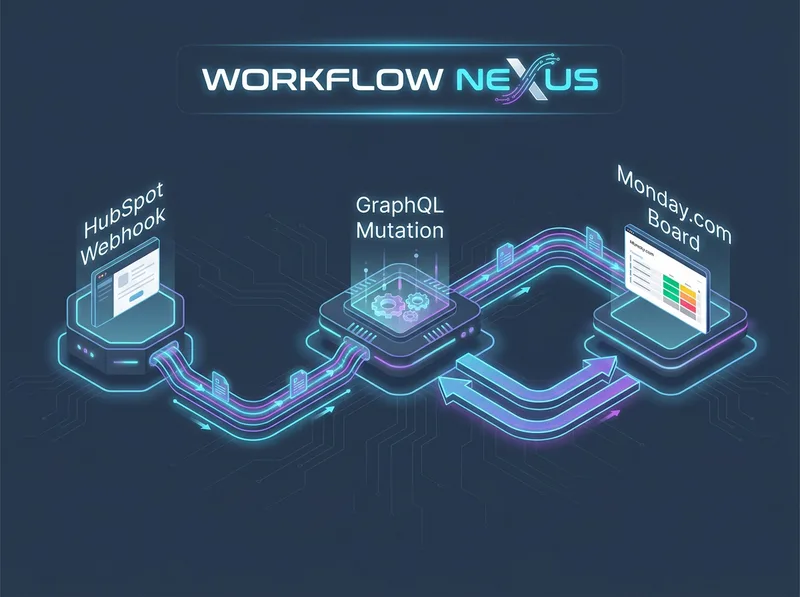
1. The Logic & API Architecture: GraphQL & REST Synchronization
This integration operates across two distinct API paradigms. HubSpot relies on standard REST architecture, executing typical HTTP GET and PATCH requests. Monday.com operates strictly on GraphQL via HTTP POST requests targeting a single universal endpoint.
You must structure your Make.com middleware to translate standard JSON objects into strict GraphQL query strings. Standard API polling limits operational scale. Native integrations check for CRM updates every 10 to 15 minutes. Polling is dead. Webhooks ensure immediate execution.
The pipeline captures the exact millisecond the `dealstage` property mutates to the internal value representing `closedwon`. It extracts the payload, hydrates the deal context, formats the data, and strikes the Monday.com server.
The Production Data Flow Protocol
[HubSpot: deal.propertyChange Webhook]
       │
       ▼ (Raw JSON Payload: dealId, propertyValue)
[Make.com: Webhook Listener & Signature Verification]
       │
       ▼ (HubSpot REST API v3: GET /crm/v3/objects/deals/{dealId}?associations=line_items)
[Data Transformation: Array Aggregator for Line Items]
       │
       ▼ (Monday.com GraphQL API v2: duplicate_board Mutation)
[Monday.com: Create Board & Subtasks for Line Items]
       │
       ▼ (HubSpot REST API v3: PATCH /crm/v3/objects/deals/{dealId})
[Writeback: Store Monday_Board_URL in HubSpot Deal Record]
System administrators must review the official schemas before mapping variables. Refer to the HubSpot CRM v3 API documentation to format line item associations correctly. Simultaneously, map your execution queries against the Monday.com GraphQL API v2 reference to validate required board duplication arguments.
2. Node-by-Node Interface Configuration Protocol
Deploying this automated dispatch engine requires precise Make.com module mapping. A single malformed GraphQL parameter will crash the entire execution thread. Follow these technical configurations explicitly.
Step 1: HubSpot Webhook Subscription & Payload Parsing
Instantiate a Make.com Custom Webhook node on a blank canvas. Extract the generated unique listener URL. Navigate directly to your private app settings in the HubSpot Developer Portal. Create a webhook subscription targeting the `deal.propertyChange` event.
Specify the target property explicitly as `dealstage`. Do not subscribe to all property changes. Subscribing to all mutations floods your Make.com queue, depleting operation limits rapidly and causing server-side rate limit drops.
Review the exact JSON structure emitted by the HubSpot webhook. This isolated payload provides the internal `objectId` (Deal ID) required for downstream REST hydration requests.
{
  "eventId": 100129384,
  "subscriptionType": "deal.propertyChange",
  "objectId": 894039281,
  "propertyName": "dealstage",
  "propertyValue": "closedwon",
  "changeSource": "CRM_UI"
}
Step 2: HubSpot Deal & Association Hydration
The raw webhook payload lacks critical financial data and line items. Insert a HubSpot CRM -> Make an API Call module immediately after the webhook trigger node. Configure the HTTP Method exactly as GET. Target the endpoint path `/crm/v3/objects/deals/{{1.objectId}}`.
You must append specific query string parameters to extract the contract scope. In the Query String fields, add `includeAssociations=true` and `properties=amount,dealname,pipeline,closedate`. To map physical deliverables or specific SaaS tiers, pass `associations=line_items` to isolate specific SKU scopings for your production tasks.
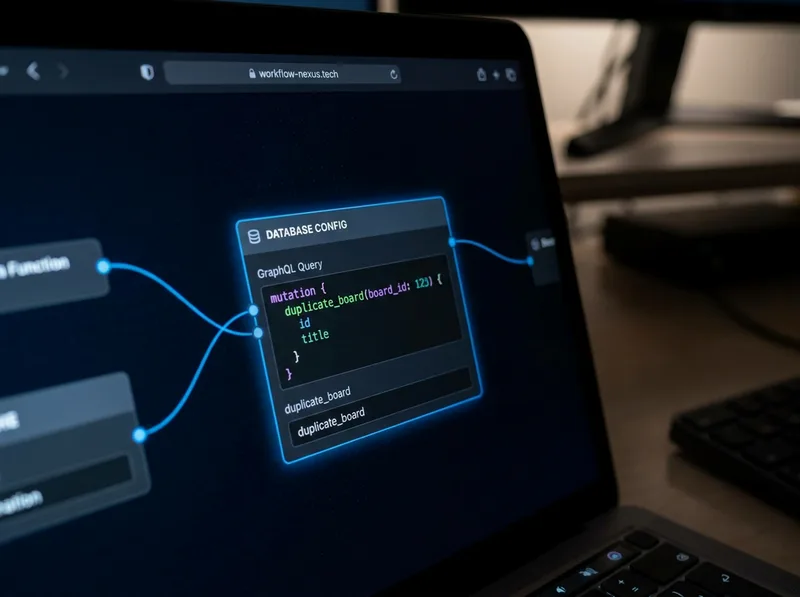
Step 3: Monday.com GraphQL Board Mutation
Attach a Monday.com -> Execute a GraphQL Query module. You must utilize GraphQL to duplicate a master template board. Standard REST endpoints cannot duplicate boards with their internal pulses, grouped hierarchies, and complex column architectures intact.
Write the exact GraphQL mutation to duplicate the master template dynamically under your designated Workspace ID. Map the `dealname` payload token from Step 2 into the new board string to guarantee naming consistency.
mutation {
  duplicate_board (
    board_id: 483920194,
    duplicate_type: duplicate_board_with_pulses,
    board_name: "Onboarding - {{2.properties.dealname}}",
    workspace_id: 1293840
  ) {
    board {
      id
    }
  }
}
Scale Operations with Monday.com Enterprise
Stop managing complex project boards on lower-tier plans with restrictive GraphQL complexity ceilings and severe API rate limits. Scale your sales operations intelligently with dedicated Enterprise workspaces.
Create Corporate Monday.com WorkspaceStep 4: Line Item Subtask Iteration & Column Mapping
If the closed contract contains multiple physical deliverables or tiered service packages, you must iterate over the HubSpot line items array. Deploy an Iterator module mapping the array `2.associations.line_items`. Connect this structural iterator to a Monday.com -> Create Subitem node.
Map the SKU titles directly into the subitem name fields. Assign target Service Level Agreement (SLA) dates natively using Make.com mathematical formatting functions. Use the syntax `{{formatDate(addDays(now; 14); "YYYY-MM-DD")}}` to lock strict ISO 8601 formatting. This syntax enforces a rigid 14-day delivery timeline automatically, keeping production accountable.
Step 5: Bi-Directional URL Writeback to HubSpot
Account executives must never leave the CRM to check project status. Fragmented software usage ruins data hygiene. Configure a HubSpot CRM -> Update a Record node targeting the `deal` object context. Map the `objectId` extracted from the original triggering webhook.
Execute the JSON payload to overwrite a custom HubSpot URL property named monday_production_board_url. Inject the static base string combined with the GraphQL return variable: https://yourcompany.monday.com/boards/{{3.data.duplicate_board.board.id}}. This specific action creates immediate bi-directional visibility across your entire technology stack.
3. Field-Battle Edge Cases & Advanced Error Handling
Production data integration breaks rapidly at scale. Unhandled API constraints, duplicate webhook firings, and malformed column payloads will crash your execution logic. Deploy the following strict configurations to secure your pipeline against data loss.
Edge Case 1: Monday.com Complexity Budget Exhaustion (GraphQL 200 OK Error)
The Pitfall: During massive end-of-quarter sales spikes, multiple enterprise deals close simultaneously. The Make.com integration appears to run flawlessly, showing a successful green module execution. However, no boards actually generate in Monday.com. Digging into the raw output logs reveals a hidden, nested string: `"Complexity budget exhausted"`.
The Logic: Monday.com enforces a brutally strict complexity budget limit of 1,000,000 complexity points per minute per account. Duplicating large master template boards containing hundreds of nested subitems, formula columns, and mirrored dependencies consumes massive complexity points instantly.
Because GraphQL processes the HTTP request structurally, the API returns an `HTTP 200 OK` status code. It masks the database failure from standard HTTP error handlers completely. The transaction silently dies.
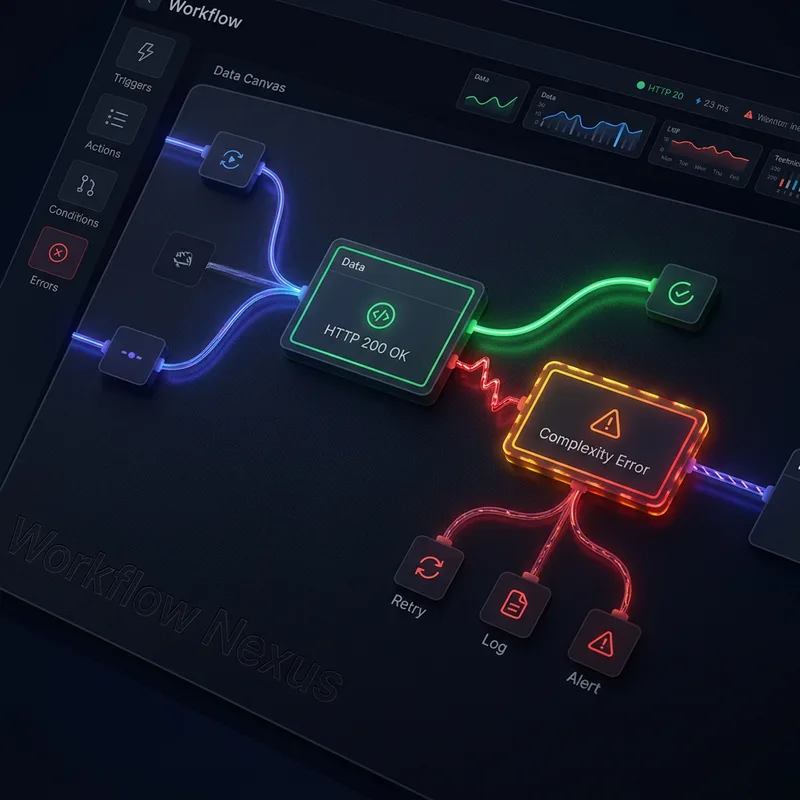
WARNING: Standard Make.com Break directives will not trigger on a 200 OK response. You must build custom routing logic to parse the output array manually to catch GraphQL exhaustions.
The Fix: Insert a Make.com Router immediately after the Monday.com GraphQL module. Apply a strict validation filter to the primary execution branch: `3.body.errors` Does NOT exist. On a secondary branch, apply the inverse filter: `3.body.errors` Exists.
Route the error state branch to a 60-second Sleep module, followed by a secondary GraphQL module to retry the exact same mutation once the token bucket successfully resets. For deeper insights on managing complex API limits, review our internal documentation on handling HTTP 429 webhook errors and pipeline buffering.
Edge Case 2: HubSpot Webhook Re-Entrancy Loops (Duplicate Board Spasm)
The Pitfall: A sales rep toggles a deal stage from Closed-Won to Decision Maker Bought-In, and then immediately back to Closed-Won within seconds to correct a typo. The webhook fires twice. The integration executes twice, generating two identical onboarding boards for a single deal and triggering massive internal team confusion.
The Logic: HubSpot webhooks lack native deduplication logic for rapid, human-induced property mutations. The system blindly dispatches a payload every time the property state changes, regardless of historical context.
PRO-TIP (Idempotency Locks): Place a conditional filter immediately before the Monday.com mutation node: 2.properties.monday_production_board_url -> Basic operator: Does NOT exist.
The Fix: By checking the custom CRM field for existing URL data, you implement a strict idempotency lock. If a board URL string is already present in the HubSpot deal record, terminate the scenario execution immediately. This logic completely prevents infinite loop generation and board spasms.
Edge Case 3: Column Value ID Mismatch Rejections (HTTP 400 Bad Request)
The Pitfall: Writing status values or user assignments into Monday.com fails abruptly with a `ColumnValueException`. The integration stalls globally with an `HTTP 400 Bad Request` log.
The Logic: Monday.com status columns and custom dropdowns do not accept raw text strings like `"In Progress"` via API payloads. They require the exact internal index label string or a strict JSON column payload structure (e.g., `{"label": "Working on it"}`). Mapping a raw HubSpot pipeline stage string directly into a Monday.com status cell violates the database schema instantly.
The Fix: Utilize a Make.com Switch function to translate raw text outputs into corresponding integer indices. Alternatively, execute the `change_multiple_column_values` mutation mapping specific internal column ID tags via a JSON payload. To prevent these structural breaks, reference our guidelines on resolving multi-currency discrepancies and payload validation.
4. Pre-Flight Production Audit & Verification Checkpoints
Do not push this integration to your live CRM ecosystem without executing the following strict validation checks. Failure to audit endpoint security will compromise your client data.
- OAuth Scope Verification: Access your Monday.com developer console portal. Ensure the active API Bearer Token possesses explicit `boards:write` and `workspaces:write` permission scopes. Without write constraints, GraphQL mutations fail natively.
- HubSpot Signature Validation: Configure a cryptographic header validation check at your Make.com webhook listener. Validate the `X-HubSpot-Signature-v3` header mathematically using your private app secret token. This rigorously rejects unauthenticated rogue webhooks from executing unauthorized board generation.
- Template Board Locking: Access your master Monday.com template. Set rigid board permission rules to prevent non-admin users from altering column ID keys or deleting foundational groups. If a user deletes the SLA column, your targeted GraphQL query breaks instantly.
- Concurrency Testing: Navigate to your HubSpot sandbox environment. Trigger 10 simultaneous deal stage changes to Closed-Won within a 5-second burst window. Confirm the Make.com queue handles the volume without breaching the Monday.com GraphQL complexity rate-limit ceiling.
Deploying these exact GraphQL endpoints, bidirectional URL synchronizations, and defensive idempotency locks transforms your tech stack into an autonomous machine. By automating board generation directly from CRM data, operations teams reclaim hundreds of hours while guaranteeing immediate, error-free client onboarding execution.